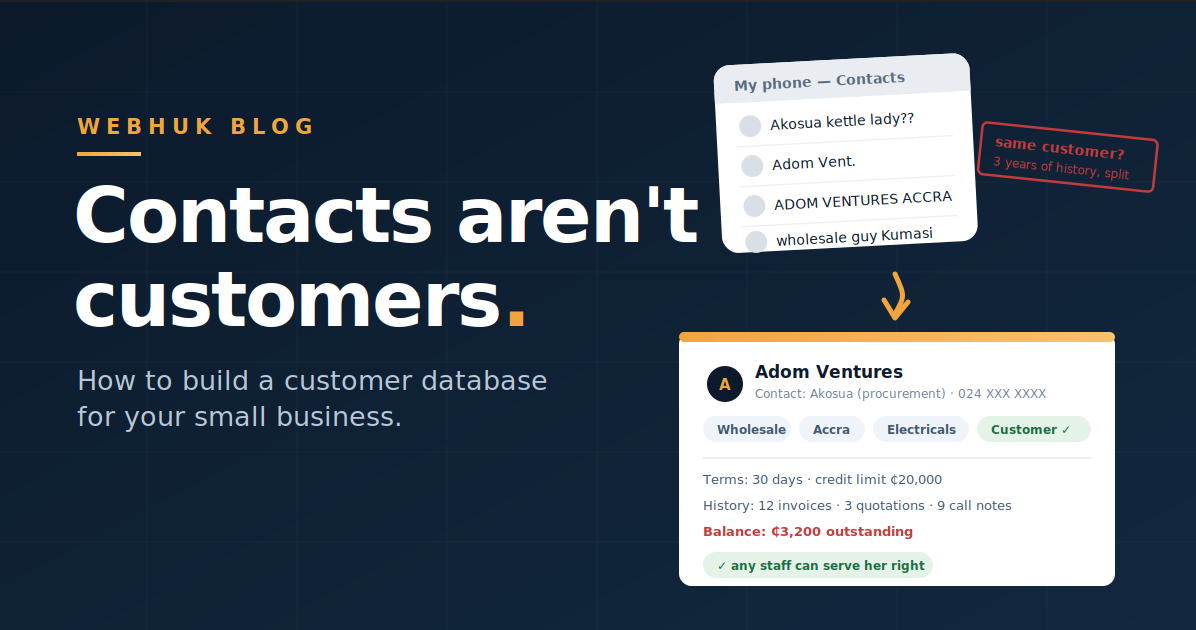
Here's a scene that plays out daily in shops across Ghana: one of your best customers walks in — a woman who has bought from you maybe fifteen times over three years. But today you're not there. The attendant serves her like a stranger: no greeting by name, no memory of what she usually buys, a small dispute about the credit terms you personally agreed with her last year. She leaves feeling like a stranger too. Strangers have no reason to be loyal.
The knowledge existed — in your head, your call history, and a WhatsApp thread. What didn't exist was a customer database for your small business: a structured record any member of your team could open and instantly know who this customer is, what she buys, what was agreed, and what she owes or is owed.
This guide covers why that database is one of the most valuable assets your business can own, exactly what to record, how to build it in two weekends, and the rules that keep it alive afterwards.
Your Customer List Is an Asset — Treat It Like One
Three reasons the customer database deserves the word asset:
Repeat business is where SME profit lives. Winning a new customer costs real effort — the enquiries, the quotes, the trust-building. A customer who already trusts you costs a phone call. But you can only work your existing customers if you can see them: who they are, what they buy, when they last bought, and who's gone quiet.
Continuity when people leave. When customer knowledge lives in a salesperson's head and personal phone, that salesperson's resignation takes a piece of your business out the door. A database makes customer relationships belong to the business.
Everything downstream depends on it. Your sales pipeline, your quotations, your invoices, your receivables — every one of them hangs off a customer record. Weak records underneath mean duplicated customers, disputed balances, and follow-ups that reference the wrong history.
What to Actually Record
Resist the forty-field CRM fantasy. A database your team maintains beats a comprehensive one they abandon. Four groups of fields do the work:
1. Identity.
- Business name (or personal name for individual customers)
- Contact person(s) — with the crucial distinction below
- Phone (the one they answer), email, location/address
2. Classification.
- Are they a customer, a vendor, or both? (Many trading relationships are two-way — the same company you sell to may also supply you.)
- Labels that let you slice the list later: customer type (retail / wholesale / corporate / institution), region (Accra / Kumasi / Tamale), and product interest (electricals / packaging / hardware). Three or four well-chosen label groups turn a flat list into a marketing and planning tool.
3. Commercial terms.
- Agreed payment terms and any credit limit — so "what did we agree with them?" has an answer that isn't a memory
- Pricing notes (wholesale tier, standing discount) so quotes stay consistent regardless of who prepares them
4. History — the part that compounds.
- Every quotation, order, and invoice linked to the record
- Their running balance (what they owe you; what you owe them if they're also a vendor)
- Call and conversation notes — what was discussed, what was promised
Identity gets a customer served correctly. History gets them served personally — and history is exactly the part a phone contact list can never hold.
One Structural Decision: Companies vs Contacts
The single most useful structure choice: separate the company from the contact persons inside it. "Adom Ventures" is the customer; Akosua in procurement and Kofi in accounts are contacts within it. Why it matters: Akosua changing jobs shouldn't orphan three years of trading history — the relationship is with Adom Ventures, and the record should say so. For individual walk-in customers, the person simply is the record; but for every business customer, model it as company-plus-people from day one.
Building It in Two Weekends
Weekend 1 — Harvest and clean. Pull customer information from everywhere it currently hides: your phone contacts, WhatsApp chats, the invoice book, old quotations, delivery notes, and everyone else's phones on the team. Get it into one spreadsheet with consistent columns (name, contact person, phone, location, type). Then dedupe ruthlessly — "Adom Ventures," "Adom Vent." and "Akosua Adom" are one customer, and merging them now prevents three divergent histories later. Expect this to be the humbling part: most owners discover they can name far fewer of their customers than they thought.
Weekend 2 — Import, classify, connect. Import the cleaned list into your system (in Webhuk, companies and contacts import from CSV). Then classify: mark each as customer, vendor, or both, and apply your labels. Finally, connect the money: enter current outstanding balances so tracking customer debts starts from truth. If you're doing this as part of moving off spreadsheets, this is precisely Week 1 of that plan.
Two weekends. After that, the database is never "built" again — it's maintained, which brings us to the rules.
The Three Rules That Keep It Alive
A customer database dies the same way a stock sheet does: quietly, through exceptions. Three rules prevent it:
- No document without a customer record. Every enquiry, quotation, and invoice attaches to a record in the database — the enquiry-to-invoice workflow enforces this naturally, because the documents are generated from the record. New customer? The record gets created at the first enquiry, taking under a minute.
- Conversations get logged. Not every pleasantry — but agreements, complaints, promises, and anything a colleague would need to continue the relationship.
- A quarterly thirty-minute hygiene pass. Merge any duplicates that crept in, update changed phone numbers, and archive the truly dead records. Small, regular, painless.
A Word on Privacy
Customer information is personal data, and holding it comes with responsibility. Ghana has data protection law (the Data Protection Act), and the principles behind it are good practice everywhere: collect what you genuinely need for the business relationship, keep it secure, don't share it carelessly, and restrict who on your team can see what — role-based access exists for exactly this. Requirements vary and evolve, so confirm your specific obligations; but "collect less, protect it better" will rarely steer you wrong.
What the Database Unlocks
This is where the two weekends pay off, repeatedly:
- The dormant-customer list. Customers who bought regularly but have gone quiet for 90+ days — the highest-return call list your business has, invisible without records.
- Your top 20. The customers who drive most of your revenue, deserving deliberate attention rather than accidental service.
- Targeted campaigns. New stock of electricals arrives → message the customers labelled electricals, not your entire contact list. Corporate gift season approaching → your corporate label is the Christmas season plan's quote list, ready in one filter.
- Consistency at the counter. Any team member opens the record and serves your fifteen-visit customer like the valued regular she is — terms, history, and balance on one screen.
Running It in Webhuk
Everything above is native structure in Webhuk: Companies and Contacts with multiple contact persons per company, each markable as customer, vendor, or both; labels for slicing by type, region, or interest; CSV import for the two-weekend build; and the part flat lists can't do — every quotation, order, invoice, payment, and callsheet conversation note threading automatically onto the customer's record, with balances always current and role-based access controlling who sees what. The database maintains itself as a by-product of the daily work, which is the only kind of database that stays alive. From 80 ghs per user per month, with a 14-day free trial — two weekends is exactly what it covers.
The Bottom Line
The names in your phone are contacts. A customer database is contacts plus classification plus terms plus history — owned by the business, visible to the team, and feeding every quote, invoice, and follow-up you'll ever send. Build it in two weekends, keep it alive with three rules, and mine it quarterly for the dormant list and the top 20. Your best customer should never be served like a stranger again — least of all on the day you're not there.
Start a 14-day free trial
Frequently Asked Questions
What information should a small business keep about customers? Four groups: identity (name, contact person, phone, location), classification (customer/vendor, plus labels like type and region), commercial terms (payment terms, credit limit, pricing notes), and history (linked quotations, invoices, balances, and conversation notes). History is what turns records into relationships.
How do I create a customer database from scratch? Harvest existing information from phones, WhatsApp, invoice books, and old documents into one consistent spreadsheet; deduplicate thoroughly; import into your system via CSV; classify with labels; and enter current outstanding balances. It's realistically a two-weekend project for a typical SME.
What is the difference between a contact list and a customer database? A contact list holds names and numbers. A database adds structure (companies with multiple contact people), classification (labels for type, region, interest), commercial terms, and — crucially — transaction and conversation history linked to each record.
How do I keep customer records up to date? Three rules: every document (enquiry, quote, invoice) must attach to a customer record, meaningful conversations get logged against the record, and a quarterly thirty-minute pass merges duplicates and updates details. Records maintained as a by-product of daily work stay alive.
Is it legal to keep customer information in Ghana? Yes, for legitimate business purposes — but personal data comes with responsibilities under data protection law. Collect what the business relationship genuinely needs, keep it secure, limit staff access by role, and confirm your specific obligations.
What software works as a customer database for a small business? Platforms like Webhuk hold companies and contacts (as customers, vendors, or both) with labels, CSV import, and automatic history — every quotation, invoice, payment, and call note threads onto the customer record with live balances. Plans start at 80 ghs per user per month with a 14-day free trial.