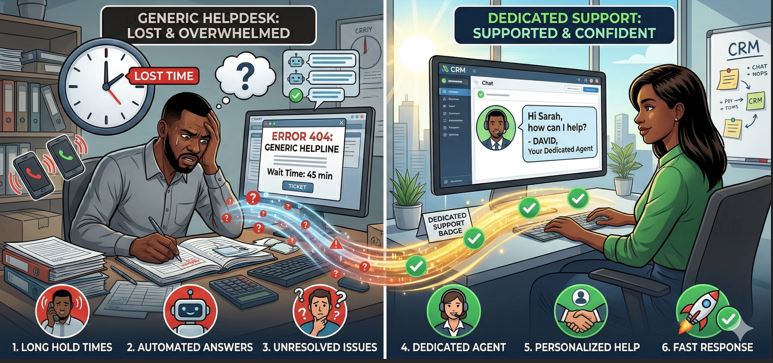
Choosing the best CRM for small business is not only about features. It’s about support.
Small businesses do not have in-house IT teams, integration specialists, or CRM administrators. When something breaks, they need help immediately. When onboarding starts, they need guidance. When automation fails, they need resolution.
That’s why support quality is often more important than pricing.
Let’s explore what dedicated CRM support means, which platforms typically offer it, and how small businesses should evaluate support before purchasing.
Why Support Matters in CRM Software for Small Business
Many small businesses invest in CRM software for small business, but adoption fails because:
-
Team does not understand the workflow
-
Automation is not configured properly
-
Data migration errors occur
-
Integrations are not functioning
-
No one responds to support tickets quickly
Without proper onboarding and support, even the top CRM platforms for SMEs can fail inside an organization.
Support reduces:
-
Implementation time
-
User resistance
-
Operational downtime
-
Data mismanagement
-
Lost leads
In short, support protects revenue.
Types of CRM Support Available in the Market
Not all support models are equal. When evaluating a small business CRM with support, check what type of assistance is included.
1. Basic Email/Ticket Support
Most SaaS CRM platforms provide:
-
Email-based ticketing
-
24–48 hour response window
-
Knowledge base articles
This is suitable for minor issues but not ideal when sales operations depend on real-time resolution.
2. Live Chat Support
Some customer relationship management software for startups includes:
-
Chat-based assistance
-
Real-time help for small issues
-
Setup guidance
This is useful during onboarding.
3. Phone Support
Phone support is critical for small businesses.
If your CRM affects:
-
Lead allocation
-
Sales tracking
-
Automation workflows
You need direct communication.
Unfortunately, many global SaaS platforms restrict phone support to higher-tier plans.
4. Dedicated Account Manager
This is premium-level support.
A CRM with dedicated account manager typically includes:
-
Personalized onboarding
-
Business workflow understanding
-
Quarterly review calls
-
Performance suggestions
-
Priority issue resolution
For growing companies, this support model is highly valuable.
What Should Small Businesses Expect from Dedicated CRM Support?
If you are investing in the best CRM for small business, here is what proper support should include:
✔ Structured Onboarding
-
Data import assistance
-
Pipeline configuration
-
User role setup
-
Automation workflow configuration
✔ Training Sessions
-
Sales team training
-
Admin training
-
Reporting walkthrough
-
Feature demonstrations
✔ Integration Assistance
-
Email integration setup
-
WhatsApp configuration
-
Website form linking
-
API setup support
✔ Ongoing Technical Assistance
-
Bug resolution
-
System updates
-
Feature upgrades
-
Performance monitoring
✔ Strategic Consultation
Beyond technical help, advanced support includes:
-
Sales process optimization advice
-
Automation improvement suggestions
-
Reporting refinement
-
Scaling roadmap planning
This level of involvement separates generic CRM vendors from growth partners.
Common Support Problems in CRM Platforms
When evaluating sales CRM for small business, watch for these red flags:
-
Support only via chatbot
-
Delayed ticket responses
-
No onboarding assistance
-
Paid support upgrades
-
Time-zone mismatch issues
-
No local representation
Support must align with your business hours and urgency level.
SaaS CRM vs Custom CRM: Support Comparison
SaaS CRM Platforms
Advantages:
-
Structured documentation
-
Scalable cloud infrastructure
-
Established support centers
Limitations:
-
Generic responses
-
Limited workflow customization
-
Priority support only in expensive plans
Customized CRM Solutions
Advantages:
-
Personalized support
-
Workflow-specific understanding
-
Faster implementation changes
-
Direct communication with development team
Limitations:
-
Depends on provider quality
-
Requires clear service agreement
For small businesses looking for long-term stability, a CRM provider offering personalized onboarding and ongoing relationship management often becomes more valuable than just feature depth.
How to Evaluate CRM Support Before Buying
Ask these questions:
-
What is the average response time?
-
Is onboarding included or charged separately?
-
Do you provide live phone support?
-
Is WhatsApp support available?
-
Do you assign an account manager?
-
Is support included in base pricing?
-
Do you provide workflow consultation?
If answers are vague, reconsider.
Who Should Prioritize Dedicated Support?
Dedicated support is critical for:
-
First-time CRM users
-
Businesses migrating from Excel
-
Sales teams above 5 members
-
Companies implementing automation
-
Startups planning rapid scaling
If you fall into these categories, support is not optional.
Where Webhuk.io Positions Itself
If your organization is searching for:
-
CRM software for small business with onboarding assistance
-
Custom workflow alignment
-
Dedicated support instead of chatbot-only replies
-
Sales automation setup help
Then a CRM provider like webhuk.io that combines customization with personalized support can offer a stronger value proposition.
Especially for businesses wanting:
-
WhatsApp automation
-
Excel import mapping
-
Unlimited user flexibility
-
Dedicated implementation guidance
Support-driven CRM adoption leads to higher ROI.
Frequently Asked Questions (FAQs)
1. What is the best CRM for small business with dedicated support?
The best CRM for small business with dedicated support includes onboarding assistance, training sessions, integration help, and responsive issue resolution through phone or assigned account managers.
2. Do all CRM platforms provide phone support?
No. Many CRM platforms offer only email or chat-based support in basic plans. Phone support is often included in higher-tier or enterprise packages.
3. Why is onboarding important in CRM implementation?
Onboarding ensures correct pipeline setup, data migration, automation configuration, and user training, which improves adoption and reduces operational errors.
4. Is dedicated CRM support worth the cost?
Yes. Dedicated CRM support reduces downtime, improves user adoption, accelerates implementation, and increases overall ROI for small businesses.
5. How do I compare CRM support quality?
Compare response time, availability (chat/phone), onboarding inclusion, assigned account managers, integration assistance, and long-term consultation offerings.