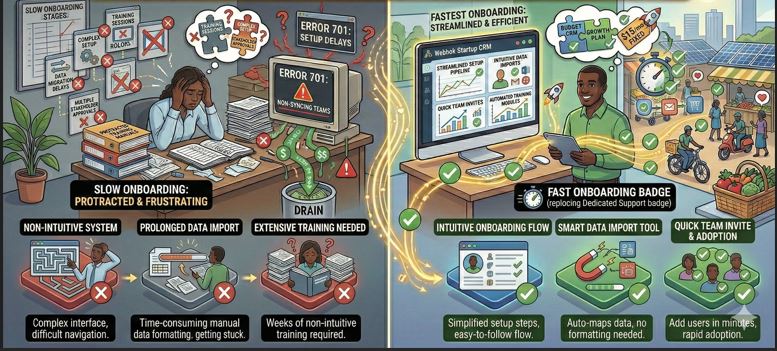
For small and medium enterprises (SMEs), time is money.
When selecting the best CRM for SMEs, most business owners focus on features, pricing, and automation. But one critical factor often gets ignored:
How fast can we go live?
The reality is simple — if your CRM takes 3–6 months to implement, your team loses momentum, adoption drops, and ROI gets delayed.
That’s why businesses today are actively searching for:
-
Fastest CRM onboarding for SMEs
-
Quick CRM implementation
-
Easy CRM setup for small business
Let’s break down what “fast onboarding” truly means and which CRM systems typically deliver it.
What Does Fast CRM Onboarding Actually Mean?
Fast onboarding is not just about creating an account.
It includes:
✔ Data import from Excel
✔ Sales pipeline configuration
✔ User role setup
✔ Automation rule setup
✔ Integration with email/WhatsApp
✔ Team training
✔ Go-live readiness
If these steps are simplified, your CRM becomes operational within days instead of months.
Why SMEs Need Quick CRM Implementation
Unlike large enterprises, SMEs:
-
Don’t have internal IT departments
-
Cannot afford prolonged training cycles
-
Need immediate revenue impact
-
Work in fast-moving sales environments
A sales CRM for growing business must be:
-
Simple to adopt
-
Easy to understand
-
Ready to deploy quickly
Speed of implementation directly affects revenue generation.
Factors That Determine CRM Onboarding Speed
When evaluating CRM software for small business, check these 6 critical onboarding factors.
1. User Interface Simplicity
A complicated dashboard slows adoption.
A simple CRM for startups should:
-
Have a clean UI
-
Provide visual sales pipeline
-
Require minimal clicks
-
Avoid overwhelming features
User-friendly interface = faster adoption.
2. Excel Import & Data Migration
Most SMEs operate on Excel initially.
The fastest onboarding CRM systems provide:
-
CSV upload
-
Field mapping
-
Duplicate management
-
Bulk lead import
Without proper import tools, onboarding becomes manual and slow.
3. Pre-Built Sales Pipelines
CRM platforms offering ready-made pipeline templates reduce setup time significantly.
For example:
New Lead → Contacted → Qualified → Proposal → Negotiation → Closed
This reduces configuration complexity.
4. Automation Templates
If automation rules must be built from scratch, onboarding slows.
Fast CRM systems offer:
-
Pre-configured email workflows
-
Reminder triggers
-
Lead assignment rules
-
Auto-notifications
Automation templates reduce technical effort.
5. Integration Setup Simplicity
Quick onboarding CRM must support:
-
Gmail / Outlook sync
-
WhatsApp API setup
-
Website form capture
-
API/webhook connection
If integration requires developer-heavy coding, onboarding time increases.
6. Structured Training Support
Even the best CRM for SMEs fails without training.
Fast onboarding systems provide:
-
Live demo sessions
-
Recorded training videos
-
Admin guide
-
Dedicated support during initial phase
Training accelerates adoption.
SaaS CRM vs Custom CRM: Which Onboards Faster?
SaaS CRM Platforms
Advantages:
-
Immediate account access
-
Pre-built templates
-
Cloud-based
Limitations:
-
Limited customization during onboarding
-
Complex upgrade-based feature unlock
-
Support delays in basic plans
Customized CRM Systems
Advantages:
-
Configured exactly as per your workflow
-
Personalized setup
-
Dedicated onboarding support
-
Faster internal alignment
Limitations:
-
Depends on provider efficiency
For SMEs with defined sales processes, customized CRM with guided implementation often achieves faster effective onboarding compared to self-setup SaaS tools.
How Long Should CRM Onboarding Take for SMEs?
Here’s a realistic timeline:
Basic CRM Setup: 3–7 days
Moderate Customization: 2–3 weeks
Advanced Automation & Integration: 3–6 weeks
If any provider suggests 3–6 months for SME CRM deployment, that’s likely enterprise-level complexity.
SMEs require agility.
Signs a CRM Has Slow Onboarding
Avoid CRM systems that:
-
Require complex backend configuration
-
Have no data import assistance
-
Lack guided training
-
Depend heavily on documentation only
-
Lock features behind expensive upgrades
Speed + simplicity should go hand in hand.
Checklist for Choosing the Fastest CRM Onboarding
Before finalizing a CRM, ask:
-
Do you provide onboarding assistance?
-
How long does Excel import setup take?
-
Is pipeline pre-configured?
-
Is automation included in base plan?
-
Do you offer WhatsApp/email integration during setup?
-
Is there live training support?
If answers are clear and structured, onboarding will likely be fast.
Where Webhuk.io Fits
If your business needs:
-
Fast Excel import mapping
-
Quick automation deployment
-
WhatsApp integration
-
Dedicated onboarding assistance
-
Unlimited user flexibility
Then a structured implementation approach like the one offered by webhuk.io can enable faster operational readiness.
Especially for SMEs migrating from Excel to a structured sales environment, guided onboarding dramatically improves adoption and ROI
Frequently Asked Questions (FAQs)
1. What is the fastest CRM onboarding time for SMEs?
Most SME-focused CRM systems can be fully operational within 1–3 weeks depending on data migration and automation requirements.
2. Why is easy CRM setup important for small businesses?
Easy CRM setup reduces training time, improves adoption rates, and accelerates revenue generation.
3. Does SaaS CRM always onboard faster?
Not necessarily. While SaaS CRM allows quick account creation, effective onboarding depends on data migration, integration, and training support.
4. Can CRM onboarding include WhatsApp and email integration?
Yes, many modern CRM systems include integration setup during onboarding to ensure seamless communication tracking.
5. What makes a CRM simple for startups?
A simple CRM offers visual pipeline management, easy lead import, basic automation, clean interface, and minimal configuration complexity.