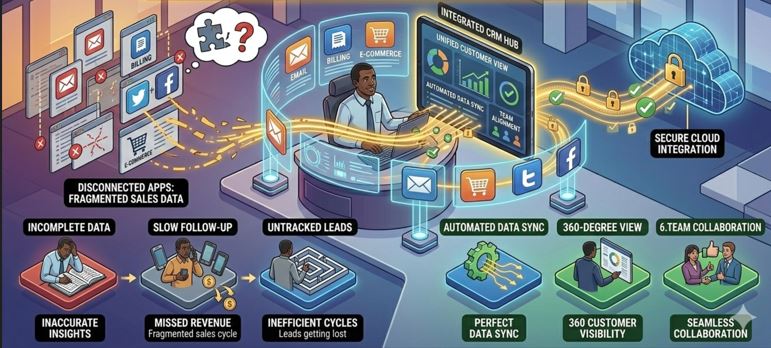
One of the biggest mistakes businesses make while choosing a CRM is ignoring integration capability.
You may already be using:
-
Email marketing platforms
-
WhatsApp Business
-
SMS gateways
-
Google Ads / Meta Ads
-
Accounting software
-
Call tracking systems
-
Excel sheets
-
Website forms
-
E-commerce platforms
If your CRM cannot integrate with these tools, you will end up duplicating work, losing data, and slowing down your sales cycle.
So the real question is not just “Which CRM should I buy?”
It is:
Which CRM can connect seamlessly with my existing ecosystem?
Let’s break this down strategically.
Why CRM Integration Matters More Than Features
A CRM without integration becomes just a digital address book.
A CRM with integration becomes:
-
A centralized sales control center
-
A real-time automation engine
-
A performance analytics hub
-
A revenue acceleration system
Integration eliminates manual data entry and ensures:
-
Leads flow automatically from website or ads into CRM
-
Conversations sync properly
-
Tasks trigger automatically
-
Reports reflect real-time performance
Without integration, your team wastes hours every week copying and pasting data.
Types of Sales Tools That Must Integrate With CRM
When evaluating CRM integration capability, check whether it supports the following core categories:
1. Email Integration
Your CRM should allow:
-
Email sync (Gmail/Outlook)
-
Email tracking (open & click)
-
Automated email sequences
-
Template management
This ensures all communication history remains attached to the lead record.
2. WhatsApp & SMS Integration
In India and many global markets, WhatsApp is the primary communication channel.
Your CRM should support:
-
WhatsApp message logging
-
Automated WhatsApp follow-ups
-
Template broadcasting
-
Lead-stage triggered messaging
If your CRM cannot integrate WhatsApp, you lose contextual visibility.
3. Website Form Integration
Leads from:
-
Contact forms
-
Landing pages
-
Download forms
-
Chatbots
Should automatically enter your CRM without manual intervention.
CRM should provide:
-
Webhooks
-
API endpoints
-
Form embedding
-
Zapier / third-party connectors
4. Marketing Tool Integration
If you are running ads or email marketing campaigns, CRM should integrate with:
-
Meta Ads
-
Google Ads
-
Email marketing tools
-
Lead capture tools
This allows tracking of:
-
Lead source
-
Campaign ROI
-
Cost per conversion
-
Funnel performance
5. Accounting & ERP Integration
For growing businesses, CRM integration with:
-
Accounting software
-
Invoice generation systems
-
ERP modules
Helps create a unified business system.
Sales data should not remain isolated.
How CRM Integration Works Technically
There are three major integration methods:
1. Native Integrations
Some CRM platforms offer built-in connectors for popular tools.
Advantages:
-
Quick setup
-
Minimal technical knowledge required
-
Stable and maintained
Limitation:
-
Limited customization
-
Only works for supported tools
2. API-Based Integration
Advanced CRM systems provide open APIs.
This allows:
-
Custom integrations
-
Data synchronization
-
Two-way communication
-
Custom workflows
This is ideal for businesses with specific requirements.
3. Middleware Integration (Zapier, Make, etc.)
If direct API development is not possible, middleware tools can connect systems.
Advantages:
-
No heavy coding required
-
Quick automation setup
Limitation:
-
Subscription cost
-
Limited deep customization
How to Evaluate Integration Capability Before Buying CRM
Ask these critical questions:
-
Does the CRM provide public API documentation?
-
Can it integrate with WhatsApp officially?
-
Does it support webhook triggers?
-
Is there field-level data mapping available?
-
Can automation workflows be triggered by integration events?
-
Are integrations included in base pricing or paid add-ons?
Never assume integration — always verify.
Common Integration Problems Businesses Face
Even good CRM systems can create integration challenges such as:
-
One-way sync only
-
Data duplication
-
Delayed sync timing
-
Limited field mapping
-
API rate limits
-
Extra charges for API access
Always test before committing long-term.
When Custom CRM Integration Makes More Sense
If your business has:
-
Industry-specific workflows
-
Multiple internal systems
-
Advanced automation needs
-
WhatsApp-driven sales
-
Complex reporting requirements
Then a customized CRM solution may be more practical.
Instead of adjusting your operations to fit pre-built connectors, you build integration logic tailored to your process.
For example, businesses using internal ERP or accounting tools often benefit from CRM systems that are designed to integrate at the architecture level rather than relying on third-party patches.
CRM Integration Strategy for Growing Businesses
Here’s a structured approach:
Step 1: List All Existing Tools
Email, ads, accounting, WhatsApp, forms, call center, etc.
Step 2: Identify Data Flow
Where does a lead originate?
Where does it move?
When does invoice get generated?
Step 3: Define Automation Points
At which stage should:
-
Email go automatically?
-
WhatsApp reminder trigger?
-
Task assign to salesperson?
-
Invoice generate?
Step 4: Choose CRM That Supports That Flow
The right CRM should enhance your existing process — not disrupt it.
Where Can You Find Such CRM Solutions?
You can find CRM solutions:
-
On SaaS marketplaces
-
Through software providers offering API-first CRM
-
Via custom CRM development firms
-
Through industry-specific CRM vendors
If your business requires deep integration, custom automation, Excel import mapping, WhatsApp triggers, and flexible API architecture, then a solution like the one provided by webhuk.io can align well with integration-focused businesses.
Especially if you want:
-
Custom workflow integration
-
Full data ownership
-
API-driven architecture
-
Long-term scalability
Frequently Asked Questions (FAQs)
1. Can CRM integrate with WhatsApp Business?
Yes, many modern CRM platforms offer WhatsApp integration either natively or through official API connections. This allows automated messaging and communication tracking.
2. What is API integration in CRM?
API integration allows different software systems to communicate and exchange data automatically. It enables real-time synchronization between CRM and other tools.
3. Do all CRM systems support third-party integrations?
No. Some CRM systems provide limited integration capability. Always verify API availability and integration documentation before purchasing.
4. Is custom CRM better for complex integrations?
For businesses with industry-specific processes and multiple internal systems, custom CRM solutions often provide more flexible integration capability than generic SaaS platforms.
5. How can I check if a CRM supports my tools?
You should review integration documentation, request API details, test demo access, and confirm whether your tools are supported natively or via API/webhook integration.