Sales Funnel Events are all the events that are associated with a typical Sales Funnel.
Webhuk comes preloaded with a bunch of Events. To get to Sales Funnel Events
1. Mouse-Over on Sales Menu
2. From the drop down and Administer section, select Sales Funnel Events Types
3. It will bring up a list window like the one below:
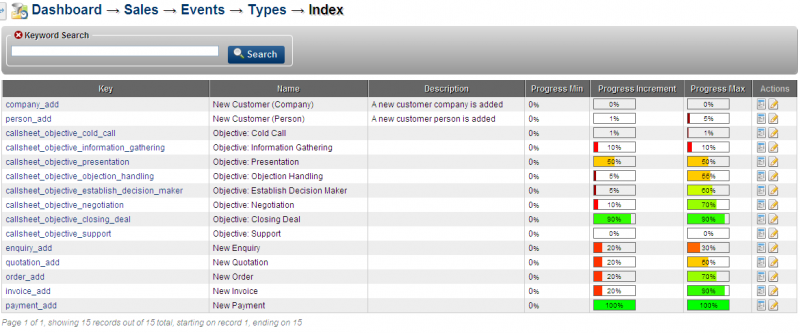
4. Click on View Icon of any Event Type
5. The next window shows the details of the Event Type and number of this Event Type in the system as Related Events(n)
6. These events can be modified as per business requirements, especially Percentage values
7. Click on the Edit icon of the Event that needs to be edited
8. The editable window that opens up, gives an option to modify various details including:
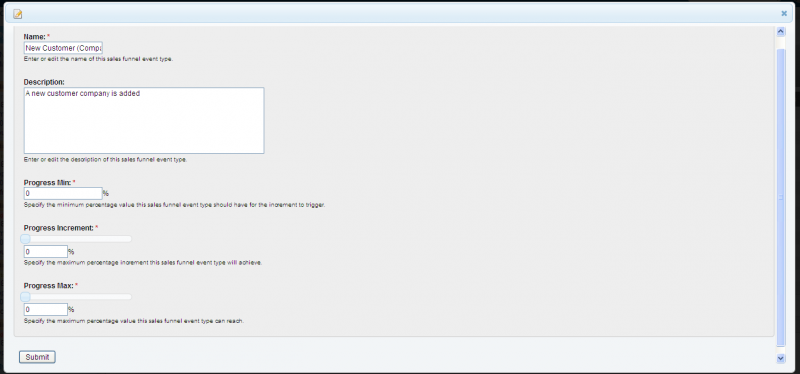
9. Enter the percentage figures for Progress, Progress Increments and Progress Max Percentages for this Event Type
10. Click Submit