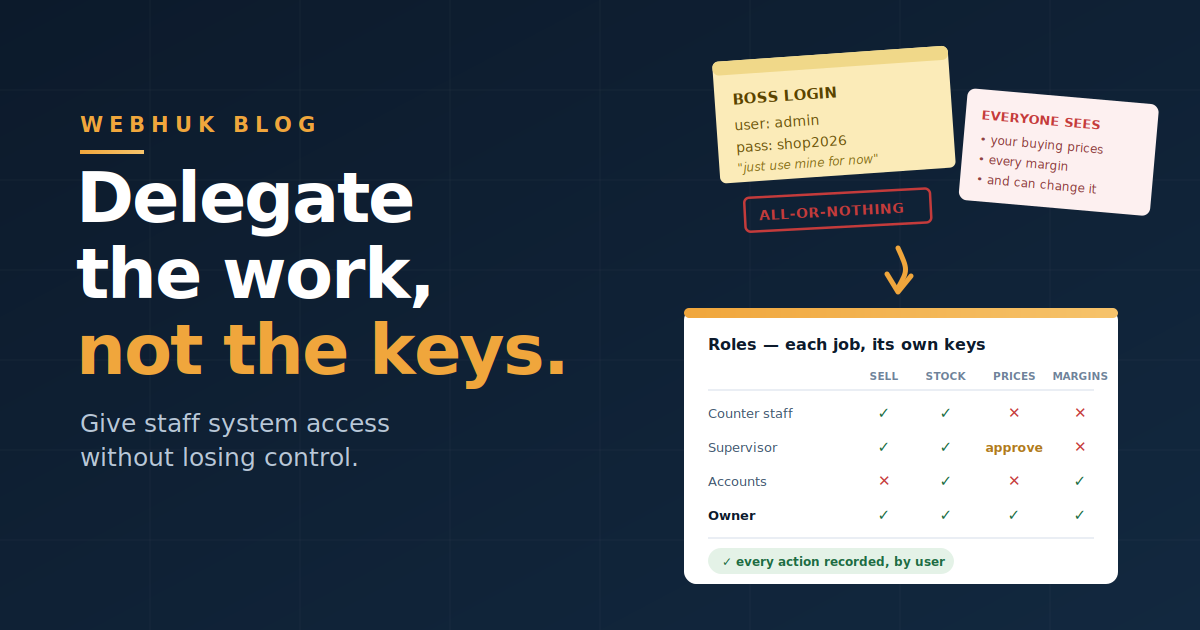
Ask an SME owner in Accra why the business still runs through their phone, and you'll rarely hear "we don't have software." You'll hear a version of this instead:
"If I put everything in one system, the sales boy sees my buying price. The shop girl can change a price when I'm not there. Somebody adjusts the stock and I'll never know."
It's an honest fear, and it's the real reason many owners remain the bottleneck in their own business — approving every discount by phone, being the only person who can answer a customer's balance, working while travelling because nothing moves without them.
But the fear is aimed at the wrong target. The problem was never giving staff access; it was giving all-or-nothing access. A shared spreadsheet or a paper book is all-or-nothing by nature: whoever holds it sees everything and can change anything, silently. Proper role-based access for small business systems solves precisely this — letting each person do their job fully while seeing only what their job requires, with a record of what was done.
This guide covers how to design roles for a small team, which few actions genuinely need protection, how approvals remove you as the bottleneck without removing your control, and how to handle the seasonal-staff problem.
The Principle: Least Privilege, Not Least Trust
The rule that governs this is least privilege: each person gets exactly the access their work requires — no more, no less. Two things to be clear about:
This is not an accusation. Good systems protect honest staff as much as they deter dishonest ones. When only three people could possibly have changed a price, and the system shows who did, the other twelve are permanently beyond suspicion. Ambiguity is what breeds accusations — and in a small business where staff are often friends and family, being wrongly suspected is its own kind of damage.
Less access also means fewer mistakes. Most "who changed this?" incidents in SMEs are errors, not theft: a well-meaning attendant fixing what looked like a wrong figure, an intern clicking through a screen they didn't understand. Restricting access reduces accidental damage more often than it stops bad actors.
Design Roles Around Jobs, Not People
Build roles from the work, not from individuals — so roles survive staff changes:
Sales / counter staff. Record enquiries, create quotations and invoices, check stock levels across branches, view customer contact details and terms. Typically not: cost prices and margins, stock adjustments, changing product prices, deleting documents.
Branch or shop supervisor. Everything sales staff do, plus: approve limited discounts, view branch performance, initiate stock transfers, and handle daily cash reconciliation for their branch. Typically not: company-wide financials or user administration.
Accounts / finance. Record payments, manage receivables and follow-ups, view customer balances and statements, produce reports. Depending on your segregation preference, they may record payments but not alter invoices — the classic separation that keeps records honest.
Procurement / stores. Raise purchase orders, receive goods into branches and containers, manage supplier records and vendor SKUs. May see buying costs (they must) but not necessarily selling margins.
Owner / manager. Everything, including user administration, pricing, costs, margins, and reports.
Two design notes. First, costs and margins are the most commonly over-shared data in SMEs — genuinely sensitive, and rarely needed by anyone who sells. Second, resist creating a role per person; when Kwame leaves and Ama takes over, you want to assign "Branch Supervisor," not reverse-engineer Kwame's permissions.
The Five Actions That Actually Need Protection
Most daily work needs no gatekeeping at all. Protect these five, and you've covered the vast majority of real risk:
- Changing product prices. Both selling prices and cost records — the numbers everything else calculates from.
- Giving discounts beyond a threshold. Small discretion at the counter is good service; unlimited discretion is an unmonitored leak. Set a percentage anyone can give, and require approval above it.
- Adjusting stock quantities. The single most abusable action in a trading business, because an adjustment can make a shortage disappear. Restrict it tightly, and always require a reason.
- Editing or deleting issued documents. An invoice that can be altered after issue is not a record. Corrections should be traceable, not silent.
- Recording payments and handling cash. Ideally the person who records a payment isn't the only person who reconciles the account it went into.
Everything else — creating quotes, checking stock, recording enquiries, logging calls — should flow freely. Over-restriction has its own cost: staff who can't do their jobs start working around the system, and a system worked around is worse than no system.
Approvals: How to Stop Being the Bottleneck
Here's the shift that changes an owner's life: you don't need to do the work to control the work.
Instead of you personally creating every quotation for a big customer, your salesperson prepares it and it waits for approval before going out. Instead of phone calls asking "can I give this customer 10%?", the discount above your threshold routes to a supervisor automatically. Instead of you being the only one who knows what's owed, accounts runs the receivables follow-ups while you see the aging report weekly.
The pattern: staff do the work, the system enforces the boundary, and you review rather than execute. Approval steps on documents like quotations and purchase orders give you the final say without making you the typist — and they're what let a business keep running properly on the days you're travelling, sick, or simply asleep.
The Seasonal Staff Problem
Peak season — the December rush, in particular — brings temporary hands into your business, often hired quickly and trained briefly. Three rules make that safe:
- Create their roles before they start, so nobody gets "the owner's login for now" (the single most common control failure in SMEs).
- Give them the narrowest useful role: record sales, check stock, look up a customer. Not: price changes, stock adjustments, margins, or other branches' data.
- Remove access the day they finish. Offboarding is a two-minute task that almost nobody does — and dormant accounts belonging to people who left are exactly the accounts nobody watches.
The same discipline applies year-round to permanent staff who move roles or leave. If your last three departures still have working logins, that's today's task.
Reviews: Control Is a Habit, Not a Setting
Permissions set once and never revisited drift. Two light habits keep them honest:
Monthly, with your numbers. Add one line to your monthly business review: any unusual discounts, stock adjustments, or document changes this month — and by whom. Two minutes, and it converts your audit trail from a forensic tool into an early-warning one.
Quarterly, a permissions pass. Who has access, at what level, and does it still match their job? Remove what's no longer needed. Ten minutes, four times a year.
How This Works in Webhuk
Webhuk is built for exactly this delegation problem: users and teams with role-based access control, so you define what each role can see and do — and assign people to roles rather than hand-crafting permissions per person. Sensitive areas (cost prices, margins, financial accounts, user administration) can sit outside the reach of counter staff, while the daily work — enquiries, quotations, invoices, stock lookups across branches, customer records and callsheets — flows freely for the people doing it. Approval processes on documents let staff prepare while you (or a supervisor) authorize, so you keep the final word without becoming the bottleneck. And because the documents, payments, and stock movements are all recorded against users in one system, "who did this, and when?" has an answer — which protects everyone.
From 80 ghs per user per month — and note that per-user pricing means you license the people who actually need access, which makes narrow, appropriate roles the cheap option too. A 14-day free trial is enough to set up your roles and watch a week of normal work run through them.
The Bottom Line
The instinct to guard the numbers is sound; keeping them only in your head is the wrong implementation. Design roles around jobs, protect the five actions that matter, let approvals replace your presence, create and remove seasonal access deliberately, and spend twelve minutes a quarter reviewing. Do that, and delegation stops feeling like exposure — it becomes what it should have been all along: your staff doing their jobs fully, and you finally free to do yours.
Start a 14-day free trial
Frequently Asked Questions
What is role-based access control in business software? It means permissions are attached to roles — sales staff, supervisor, accounts, procurement, owner — rather than individuals. Each role can see and do exactly what that job requires, and people are assigned to roles, so access survives staff changes without rebuilding permissions.
What should staff not be able to see in a business system? Typically cost prices and margins, company-wide financials, and user administration. Sales staff rarely need buying costs to do their jobs well, and those figures are the most commonly over-shared data in small businesses.
How do I stop staff from changing prices or stock without permission? Restrict the five high-risk actions: changing prices, discounts above a set threshold, stock quantity adjustments, editing or deleting issued documents, and recording payments. Require approval above discount limits and a reason for every stock adjustment.
How can I delegate work without losing control of my business? Use approval workflows: staff prepare documents like quotations and purchase orders, and they wait for authorization before going out. You review rather than execute, which keeps the final say without making you the bottleneck when you travel.
How should I handle system access for temporary or seasonal staff? Create their roles before they start (never share an owner login), give the narrowest useful access — record sales, check stock, look up customers — and remove access the day they finish. Dormant accounts of departed staff are the ones nobody monitors.
Does restricting staff access mean I don't trust my team? No — well-designed access protects honest staff. When the system records who did what, employees who did nothing wrong are beyond suspicion, and most access-related incidents in small businesses are honest mistakes rather than theft.