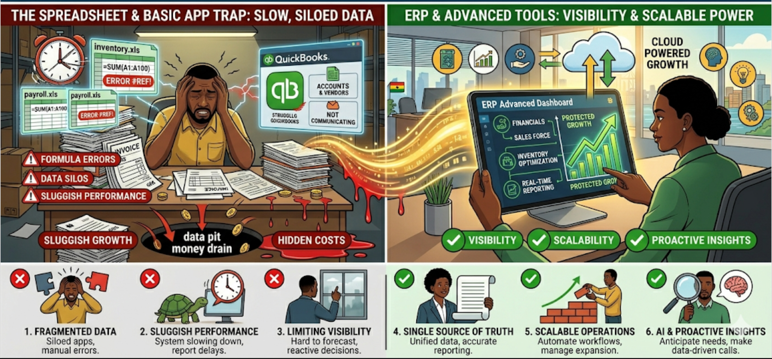
QuickBooks is excellent at what it does. It tracks income and expenses, generates financial reports, handles payroll, and keeps your books in order. For a startup or a business with straightforward operations, it is more than enough.
But QuickBooks is an accounting tool, not an operations platform. And at some point in every growing business, the gap between accounting and operations becomes a problem. You find yourself exporting data from QuickBooks into spreadsheets to track inventory. You build a separate system for managing quotations and sales orders. You create workarounds for procurement because QuickBooks does not handle purchase orders the way your business needs.
The moment you start maintaining parallel systems to compensate for what your accounting software cannot do, you have outgrown it. And the longer you wait to address that, the more fragmented your operations become.
Where Businesses Go Wrong: Stretching Accounting Tools Into Operational Roles
The mistake is not choosing QuickBooks or Excel in the first place. Both are perfectly good tools for their intended purpose. The mistake is continuing to depend on them for tasks they were never designed to handle.
QuickBooks is a ledger. It records what has already happened. It tells you how much you invoiced, what you spent, and what your financial position looks like. What it does not do — at least not well — is manage the operational flow that generates those numbers: quoting customers, converting quotes to orders, tracking inventory across multiple locations, managing supplier procurement, and connecting all of that to your invoicing and collections.
Excel fills the gaps, but in doing so, it creates new problems. Every spreadsheet you build to compensate for a missing feature is another data silo. Another file that needs manual updating. Another source of truth that might not agree with the others.
A Scenario You Might Recognise
Kofi runs a plumbing supplies wholesale business in Takoradi. He has used QuickBooks for three years and it handles his bookkeeping well. But his daily operations look nothing like an accounting workflow. His sales team quotes customers from a shared Google Sheet. When a quote is accepted, someone manually enters the sale into QuickBooks. Inventory is tracked in a separate Excel file that the warehouse manager updates at the end of each day. Purchase orders to suppliers are handled through email with no formal tracking.
Kofi spends every Friday afternoon reconciling the numbers between his sales sheet, his inventory file, and QuickBooks. The totals never match on the first pass. Last month, his team invoiced a customer for an item that was already out of stock because the inventory sheet had not been updated. The customer cancelled the order and placed it with a competitor.
Kofi does not need a better spreadsheet. He does not need to replace QuickBooks for accounting. He needs a system that handles the operational workflow that QuickBooks was never built to manage.
What This Is Costing You
Double Entry and Wasted Hours
When your operational tools do not talk to your accounting system, every transaction gets entered at least twice — once when it happens and once when it is recorded in the books. For teams of two or three people, this can consume several hours per week in pure data re-entry and reconciliation.
Decisions Based on Yesterday’s Data
QuickBooks tells you what happened. Spreadsheets tell you what was true the last time someone updated them. Neither gives you a real-time operational picture. If you are making purchasing decisions based on an inventory count from two days ago, or quoting a customer based on a price list that has not been updated since the last shipment, you are operating on stale information.
Scaling Pain
The spreadsheet and QuickBooks model can sustain a small, single-location business. But add a second branch, a larger supplier base, or a higher transaction volume, and the cracks become failures. Reconciliation takes longer. Errors multiply. The owner spends more time managing systems than managing the business.
Customer Experience Suffers
Slow quotes, incorrect invoices, and stock availability mistakes all affect how customers perceive your business. In competitive markets, reliability is a differentiator. If your operations cannot keep pace with customer expectations, you lose business to competitors who have more structured systems.
A Better Way to Operate: Adding an Operational Layer Without Ripping Out What Works
The transition from QuickBooks and Excel does not have to be dramatic. You do not need to replace your accounting system overnight or migrate years of financial data. What you need is an operational layer that sits alongside your existing tools and handles the workflow that accounting software was never meant to manage.
This means a platform that manages the full cycle: customer enquiry to quotation to sales order to invoice to payment, with inventory and procurement integrated at every step. Your accounting tool can continue to handle what it does best — financial reporting, tax compliance, payroll — while the operational platform manages what it cannot.
The key is choosing something designed for SMEs. Not a system that takes six months to implement and costs more than your annual revenue. Something that can go live quickly, requires minimal technical setup, and starts delivering value in weeks rather than months.
How Webhuk Bridges the Gap
Webhuk is built for exactly this moment — when your business has outgrown spreadsheets and basic accounting tools but does not need (or want) a heavy enterprise ERP. It is a cloud-native operational platform that handles quoting, ordering, procurement, multi-branch inventory, invoicing, and payment tracking in one connected system.
With Webhuk, the quote your sales team creates becomes the order, which becomes the invoice, which connects to your payment dashboard. No re-keying. No reconciliation between five different files. Inventory updates in real time across all branches as goods move in and out. Purchase orders link to supplier quotations and stock receipts. Every piece of operational data flows through one system.
Webhuk is designed for fast deployment. Most businesses go live within 30 days with no heavy consulting or complex data migration. It works alongside your existing tools during the transition, so you can move at a pace that suits your team.
If you are spending more time managing your systems than managing your business, that is the signal. The transition does not need to be painful. It just needs to start.
Ready to move beyond QuickBooks and Excel? Try Webhuk free for 7 days and experience what a connected operational workflow feels like.
Learn more: How the Full Quote-to-Invoice Workflow Works in Webhuk
Frequently Asked Questions
Does moving to Webhuk mean I have to stop using QuickBooks?
Not necessarily. Many businesses use Webhuk for operational workflows — quoting, ordering, inventory, procurement — while continuing to use their existing accounting tool for financial reporting and compliance. Over time, you can decide how much to consolidate.
How do I know if I have outgrown QuickBooks?
Common signs include spending hours on reconciliation between spreadsheets and your accounting tool, tracking inventory outside of QuickBooks, managing quotes and orders in separate systems, and finding that your team enters the same data more than once.
Is Webhuk expensive compared to QuickBooks?
Webhuk is designed with SME-appropriate pricing. Unlike enterprise ERP systems that cost tens of thousands to implement, Webhuk offers a modular approach where you pay for what you use. Most businesses find the cost justified by the time savings alone within the first few months.
How long does the transition take?
Most SMEs go live with Webhuk’s core modules within 30 days. The platform is designed for fast onboarding with pre-configured workflows, so your team can start using it quickly without a lengthy implementation project.
Will my team be able to use Webhuk without IT support?
Yes. Webhuk is designed for business users, not IT teams. The interface is intuitive and the onboarding process guides you through setup step by step. Most users are comfortable with the platform within a few days.