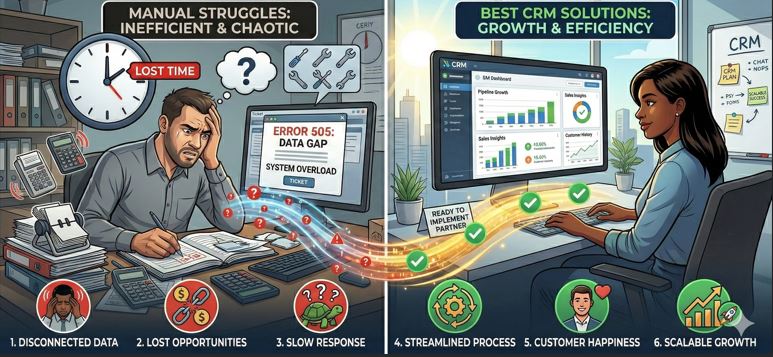
For small businesses, choosing the right CRM is no longer optional — it’s a strategic decision that directly impacts sales velocity, customer retention, and operational efficiency.
If you’re ready to implement a CRM system immediately, you don’t just need features. You need:
-
Fast deployment
-
Ease of use
-
Affordable pricing
-
Scalability
-
Reliable support
-
Integration flexibility
Let’s break down what makes a CRM solution truly “best” for small businesses — and what you should evaluate before making a decision.
Why Small Businesses Need CRM Now More Than Ever
In today’s competitive environment, small businesses operate with limited resources but high expectations. Leads come from multiple sources — website forms, WhatsApp, social media, referrals, ads — and without a centralized system, opportunities get lost.
A CRM helps you:
-
Track leads in a structured pipeline
-
Automate follow-ups
-
Assign tasks to team members
-
Monitor conversion performance
-
Improve customer experience
-
Generate data-driven reports
Without CRM, growth becomes chaotic. With CRM, growth becomes systematic.
Key Features Small Businesses Should Look For
Before comparing platforms, understand what matters most for implementation-ready SMEs.
1. Simple and Fast Implementation
Small businesses don’t have time for 6-month deployments. A good CRM should be ready within days or weeks.
Look for:
-
Pre-configured sales pipelines
-
Easy data import from Excel
-
Minimal training requirement
-
Intuitive UI
2. Lead & Sales Pipeline Management
A structured visual pipeline ensures that every lead moves systematically from:
New Lead → Contacted → Qualified → Proposal → Negotiation → Won/Lost
Pipeline visibility alone can increase conversion rates significantly.
3. Automation Capabilities
Modern CRM systems must include automation features such as:
-
Automated email follow-ups
-
WhatsApp messaging
-
Task reminders
-
Deal stage triggers
-
Lead nurturing workflows
Automation reduces manual dependency and increases consistency.
4. Customization Flexibility
Every small business operates differently. A generic CRM might not align with your workflow.
Look for:
-
Custom fields
-
Custom pipelines
-
Role-based access
-
Module-level permissions
-
Industry-specific customization
If you are in manufacturing, real estate, trading, services, or consulting — your CRM should adapt to you, not the other way around.
5. Reporting & Analytics
Small business owners need clarity.
Essential reports include:
-
Lead source performance
-
Salesperson performance
-
Conversion ratio
-
Monthly revenue tracking
-
Forecast reports
Data-driven decisions separate growing SMEs from struggling ones.
Types of CRM Solutions Available
1. SaaS-Based CRM (Subscription Model)
Popular global SaaS CRMs typically offer:
-
Cloud hosting
-
Monthly or annual subscription
-
Per-user pricing
-
Standardized modules
Advantages:
-
Quick start
-
No server management
-
Scalable
Limitations:
-
Recurring cost
-
Limited deep customization
-
Ownership not yours
2. One-Time Payment Custom CRM
Some providers offer:
-
Fully customized CRM
-
One-time payment model
-
100% ownership
-
Unlimited users
-
Industry-specific configuration
Advantages:
-
Long-term cost efficiency
-
High customization
-
Control over data and features
-
Tailored workflows
For small businesses planning long-term growth, this model often proves more economical.
How to Identify the “Best” CRM for Your Business
Instead of asking, “Which CRM is best?” ask:
-
Does it match my workflow?
-
Can my team adopt it quickly?
-
Is the pricing sustainable?
-
Does it integrate with my tools?
-
Can it scale as I grow?
The best CRM is not the most famous one — it’s the one aligned with your operations.
Implementation Checklist for SMEs
Before finalizing a CRM:
✔ Define your sales process
✔ Clean your Excel lead data
✔ Identify automation requirements
✔ Decide user roles
✔ Plan onboarding session
✔ Set KPIs
Preparation reduces implementation friction by 70%.
Recommended Approach for Small Businesses
If you are a small or growing business, consider:
-
Avoiding over-complex enterprise tools
-
Choosing CRM that fits your current team size
-
Ensuring quick deployment
-
Selecting scalable architecture
If your business requires:
-
WhatsApp automation
-
Excel data import
-
Custom lead stages
-
Unlimited user access
-
Full ownership
-
No recurring per-user cost
Then a customized CRM solution like the one offered at webhuk.io can be a strong strategic option.
Instead of adapting your business to software, your software adapts to your business.
Common Mistakes SMEs Make While Choosing CRM
-
Choosing based on brand name only
-
Ignoring hidden subscription costs
-
Not considering scalability
-
Skipping automation capabilities
-
Overlooking onboarding support
A CRM is not an expense — it’s an infrastructure investment.
Final Thoughts
The best CRM solution for small businesses ready to implement is one that offers:
-
Fast onboarding
-
Easy customization
-
Affordable pricing
-
Automation features
-
Clear reporting
-
Scalability
There is no universal answer — but there is a right solution for your business.
Evaluate your needs, define your growth vision, and select a CRM that becomes your long-term business partner.
Frequently Asked Questions (FAQs)
1. What is the best CRM for small businesses with limited budget?
The best CRM for small businesses with limited budgets is one that offers essential sales pipeline management, automation features, and reporting without high per-user subscription costs. Many SMEs prefer scalable CRM solutions that provide either affordable monthly plans or one-time ownership models to reduce long-term expenses.
2. How long does it take to implement a CRM in a small business?
Implementation time depends on customization and data complexity. A basic CRM setup can be completed within 3–7 days. If custom workflows, automation rules, and data migration from Excel are required, it may take 2–4 weeks. Proper planning significantly speeds up deployment.
3. Is cloud-based CRM better for small businesses?
Cloud-based CRM systems are generally preferred because they require no infrastructure management, allow remote access, and provide automatic updates. However, businesses seeking deeper customization and ownership may choose tailored CRM solutions with controlled hosting environments.
4. Can CRM software integrate with WhatsApp and email tools?
Yes. Modern CRM platforms support integration with email systems, WhatsApp messaging, SMS tools, and marketing automation software. This enables automated follow-ups, lead nurturing, and centralized communication tracking, which improves response time and conversion rates.
5. What should small businesses avoid when choosing a CRM?
Small businesses should avoid:
-
Selecting overly complex enterprise-level CRM systems
-
Ignoring hidden subscription costs
-
Choosing tools without automation features
-
Not checking scalability options
-
Skipping onboarding support
A CRM should simplify operations — not complicate them.