Cost Price is overall price of an inventory item inclusive of all Shipping & Duty / Taxes that are applicable to the items in case of import of these items. Webhuk has an inbuilt Logistics with Cost Price tool that can enable businesses to quickly calculate the Cost Price of inventory items inclusive of all Shipping & Duty / Taxes on a per unit basis. Thereby making it easy for a business to establish a selling price for those inventory items which is inclusive of Shipping & Duty / Taxes.
The process of Logitics with Cost Price starts at the time of adding a New Logistic.
Adding New Logistic
- On Dashboard, mouseover or click on Inventory
- Navigate to New Logistic
- New Logistic Window will open
- Logistic type should be Incoming
- Enter details of the SKU, Branch (The branch should have containers), Quantity, Container & Reason
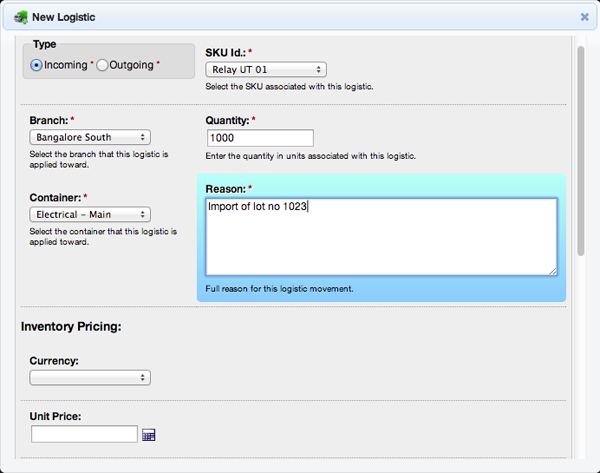
- Once the above step has been completed, scroll down to the Inventory Pricing section of the window
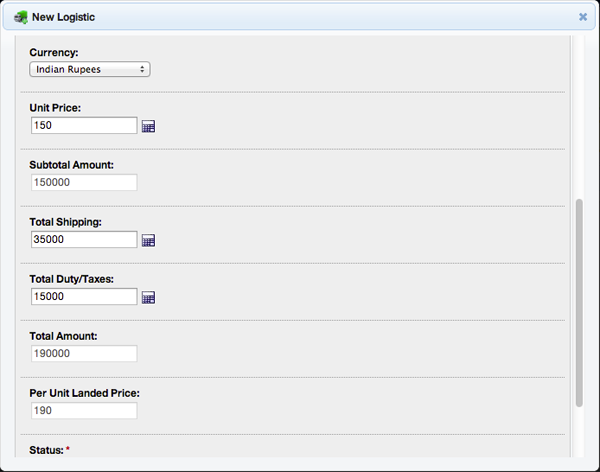
- Select Currency
- Enter the Unit Price of the SKU Item
- Subtotal Amount will be automatically calculated (Unit Price x Quantity)
- Enter Total Shipping Amount & Total Duty / Taxes
- Total Amount will be automatically calculated (Subtotal Amount + Total Shipping + Total Duty / Taxes)
- Webhuk will also calculate the Per Unit Landed Price automatically (Total Amount Divided By Quantity)
- Select Status
- Select Approved