Home / Blog / Editing an existing Vendor SKU
Article
Share Post

Editing an existing Vendor SKU

K. Romeo Aug 22, 2025
Inventory Reporting
Editing an existing Vendor SKU


To Edit an Existing Vendor SKU


  1. On Dashboard, mouseover or click Inventory
  2. Navigate to All Vendor SKUs
  3. List of Vendor SKUs will open
  4. Select the Vendor SKU that you want to edit
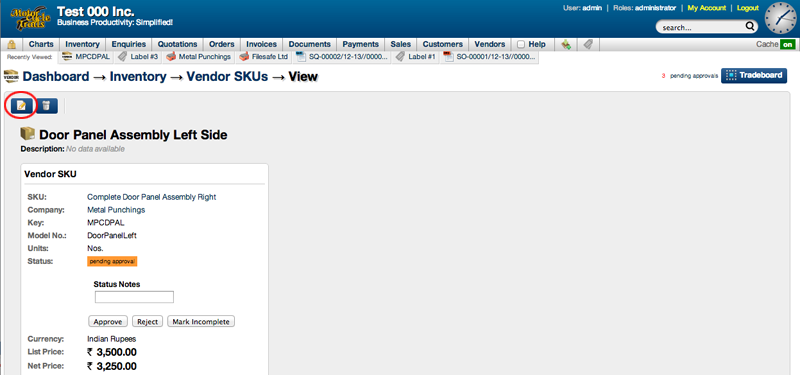
  5. Vendor SKU view will open
  6. Select Edit Icon
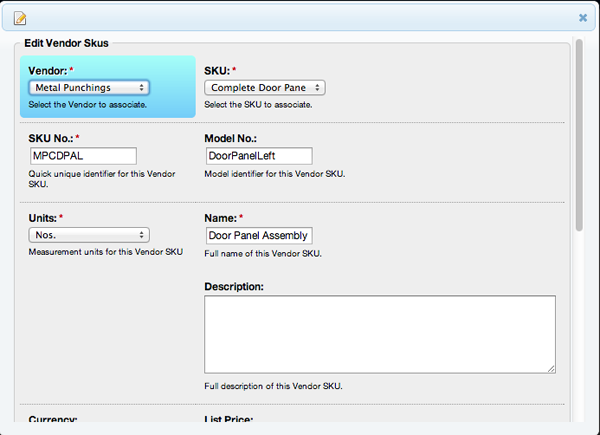
  7. Edit Vendor SKU page will open
  8. Edit details of the Vendor SKU
  9. Scroll down to the end of the page
  10. Select Submit


Screenshot of vendor sku view


Screenshot of editing vendor sku


About the author
K. Romeo writes practical ERP and operational workflow guides for SMEs in trading, retail, and multi-branch businesses. The focus is always the same: reduce manual work, increase visibility, and protect margin.