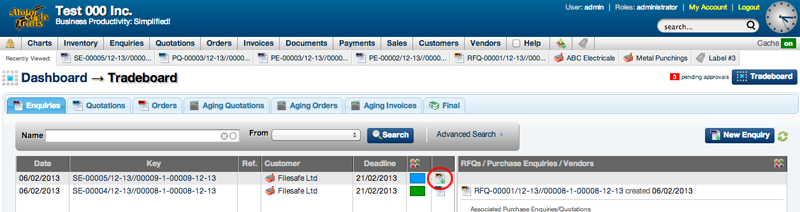
The Tradeboard can be used to directly add new enquiries and generate RFQ's from these enquiries. The Tradeboard also allows easy tracking of the status of these RFQ's.
To Add a New Enquiry
- On Tradeboard, select New Enquiry
- New Enquiry Window will open
- Select details of the enquiry
- Select Submit
- Webhuk will automatically generate the enquiry form
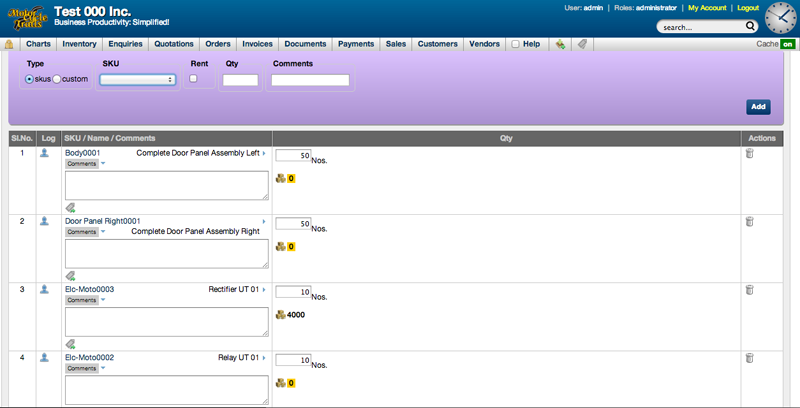
- Scroll down to the section where you need to add SKUs for which you need to generate RFQs
- Select the SKU(s), enter quantity and comments if needed
- Once you have added SKU(s) scroll down to the end of the page and select Approve Enquiry
Once you have approved the enquiry, the view enquiry page will open
To Generate RFQ
- RQF's can be generated from the View Enquiry Page or from the Tradeboard directly
- Once you select the method that you want to generate the RFQ, you will be asked if you want to auto-generate an RQF from this enquiry
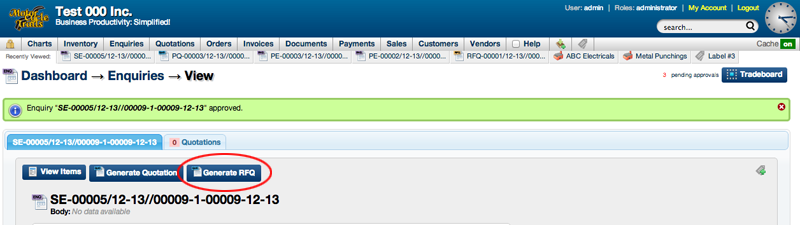
- Select Yes / OK
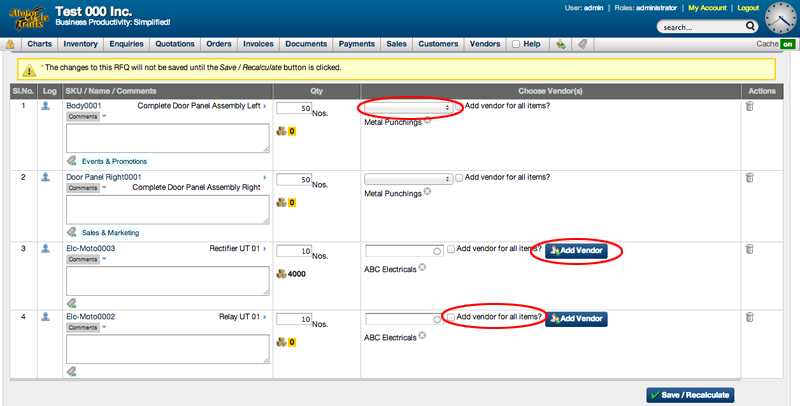
- The Edit RFQ page will open
- Here you can assign vendors or add new vendors that you want to send out RFQ's to
- If your vendors have been labelled in the past, then you will see a drop down box that gives you a list of vendors suitable for the specific enquiry
- Once you select your vendor for the different enquiries select 'Add Vendor'
- You may also have some vendors who can supply you with quotations for all enquiries, in such cases check mark the 'Add vendor for all items'
- Once you have selected vendors for the various enquiries, scroll down to the end of the page and select Approve RFQ
Further Reading Vendor Quotations from RFQs